I Fed My Entire Codebase into NotebookLM – The Results Actually Blew My Mind!
Ai News: NotebookLM has quietly become one of my most-used tools whenever I need to learn something new. Whether it’s wading through long documentation, clearing up complex concepts, or exploring niche topics without opening fifty different tabs—it’s been a lifesaver. It doesn’t just help me “search” for things; it helps me actually think through them.
Over time, I started wondering: What would happen if I applied this same approach to something I already know inside out—my own code? Would it help me think better, or perhaps teach me something I missed? Driven by this curiosity, I ran a bit of a weird experiment. I gave Google NotebookLM access to my entire codebase and treated it like a “human teammate.”
The results were far more interesting than I expected.
Knowing the Code vs. Remembering Why You Wrote It
This is a challenge every coder faces. I know my codebase; I’m the one who wrote it, after all. I remember the features, I know the structure, and I recall the major decisions made during development.
And yet, when I return to a project after a few weeks, I feel that familiar friction. I know where things are, but I don’t always remember why they are there. I remember what a piece of code does, but the specific assumptions it was built on start to fade from memory.
This is the reality of most long-running projects. The code feels familiar, but it doesn’t feel “fresh.” Even making minor changes starts taking more time than it should. I often find myself opening multiple files just to trace a basic flow. Sometimes, I even hesitate before modifying a function—not because it’s hard, but because I’m not 100% sure how far the ripple effects will go.
That’s exactly what pushed me toward this experiment. I wasn’t looking to replace my own thinking, nor did I want an AI to make decisions for me. I just wanted a faster way to “get back into the zone.” So, I took a Python project I’d been working on and fed the whole thing into NotebookLM.
The Experiment: Giving the AI Full Context
Full context, not just snippets.
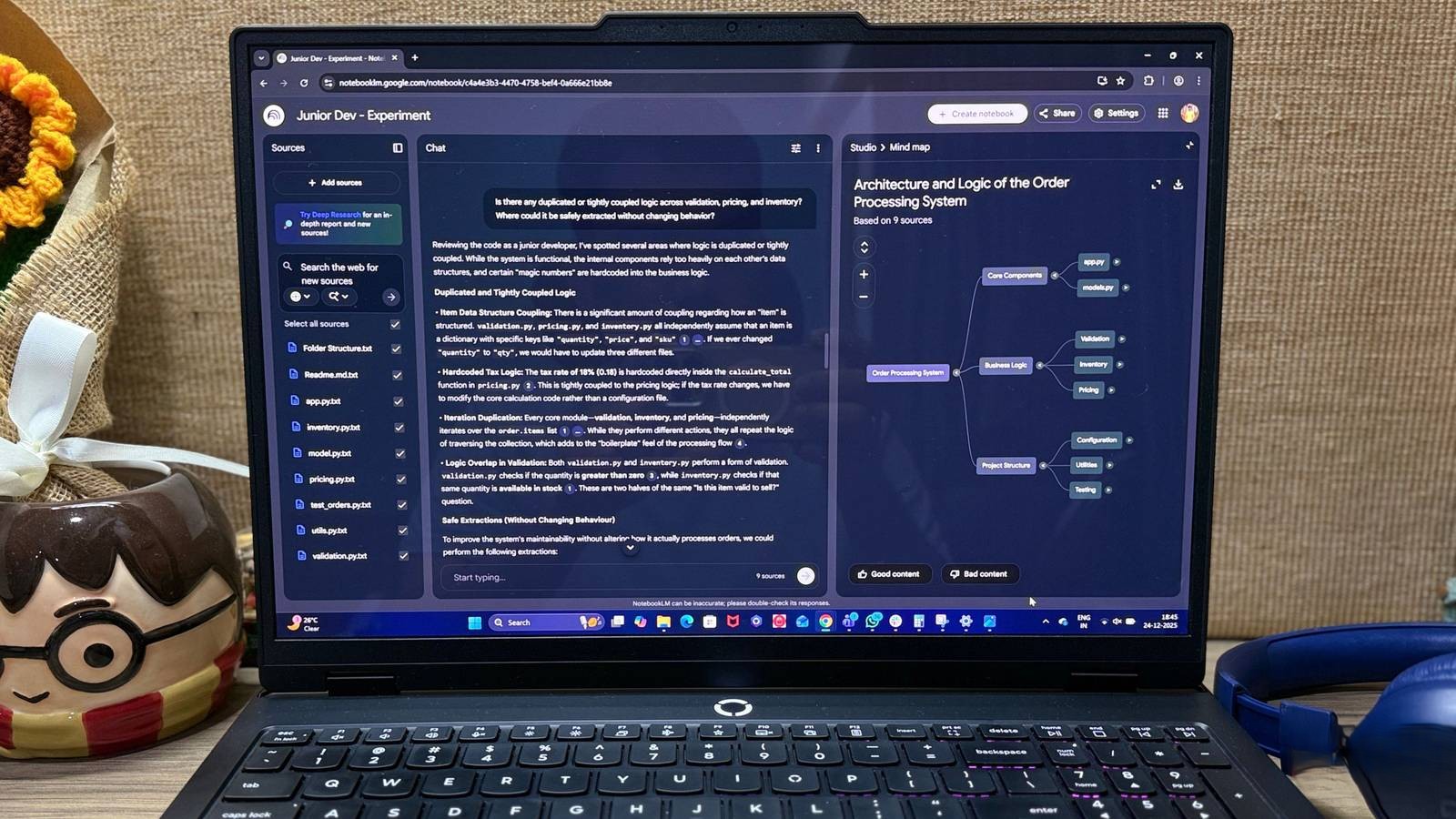
For this to work, I didn’t want to just paste random code blocks or half-baked examples. I needed something real. I used a complete “Order Processing System” I wrote in Python. It had everything: validation logic, pricing modules, inventory handling, utilities, and even basic test suites. It wasn’t “NASA-level” complex, but it was realistic enough to behave like a real-world project.
Once the project was ready, I uploaded the entire codebase to NotebookLM. I treated the .py files as plain text, included the README, and even provided a simple overview of the folder structure. The goal was to give NotebookLM the same context a Junior Developer would get on their first day: the code, the structure, and the documentation.
I didn’t offer any manual explanations or special “prompt engineering.” I just uploaded the files and let it read the project from start to finish. From that point on, every question I asked was based on the assumption that it already “knew” the code—because, remarkably, it did.
My New ‘Junior Developer’
It’s not replacing me; it’s thinking with me.
Once the code was indexed, I started treating NotebookLM like a new hire who had just finished reading the repo.
-
The Onboarding: I started by saying, “Assume you’ve just joined this project. What’s your understanding of the system?” The response was surprisingly thoughtful. It gave me an onboarding summary, outlined the core workflow, and provided a solid system overview.
-
Debugging: I used it exactly how I’d use a junior dev during a bug hunt. I told it, “Inventory errors are popping up inconsistently. Based on the code, where could the leak be?” Instead of guessing, it traced the inventory logic step-by-step and pointed out exactly where things could potentially break.
-
Architecture: I asked if the validation and pricing logic were too “coupled” (interdependent). It didn’t just jump to suggest a refactor; it first explained the risks of the current setup.


That’s when it clicked—NotebookLM wasn’t making choices for me. It was helping me process my own logic, acting as a sounding board.
5 Must-Have AI Tools for Small Businesses Set to Rule 2026
What is NotebookLM? (Features You Should Know)
(Note: If you’re new to this tool, here’s a quick breakdown of why it’s different from your average chatbot.)
-
Multiple Sources: You can upload Google Docs, PDFs, text files, and even Google Slides.
-
Audio Overview: This is a showstopper. It can turn your documents into a “Podcast” where two AI hosts discuss your content.
-
Grounded Answers: Unlike ChatGPT, which draws from the whole internet, NotebookLM stays strictly within the sources you provide. This significantly cuts down the risk of “hallucinations” (fake info).
-
Citations: When it gives an answer, it highlights exactly which part of your document the information came from.
It’s Not Perfect, But It’s Better Than I Hoped
Useful, as long as you know the limits.
This was a manual experiment. Since I uploaded the files manually, I’d have to re-upload them every time the code changed. This obviously isn’t practical for massive, fast-moving enterprise codebases where changes happen every hour.
Also, a word of caution: I wouldn’t recommend putting highly confidential or proprietary company code into any external AI tool unless you’re sure about the privacy terms.
But for a side project or an older codebase? The experience was solid. Once the code was in, NotebookLM remained consistent and helpful. It was actually able to reason with the logic.
The Bottom Line: Productivity Without “Switching Off”
This experiment wasn’t about finding a “perfect” automated workflow. I just wanted to see if having full context on-demand would make working with my own code easier.
And honestly? It removed the friction. I spent less time hunting through old files and more time actually thinking about the changes I wanted to make. Instead of “re-learning” my project every time I opened it, I could focus on improving it. NotebookLM helped me reconnect with the logic I had built but was starting to forget.
At the end of the day, it’s not about depending on AI. It’s about using it as a support tool—a “Second Brain” that keeps your project’s context alive while you focus on the big picture.
Best AI for Customer Support Teams: 8 Tools to Grow Your Business in 2026
FAQs
Q1: Is NotebookLM free to use?

Ans: Yes! Currently, Google NotebookLM is completely free for users. You can just log in with your Google account and start building your notebooks.
Q2: Can I upload my confidential company code? Ans: I wouldn’t recommend it. It’s better to stick to personal projects, open-source work, or learning materials. Always be cautious with proprietary data.
Q3: Can it run or execute my code?
Ans: No, NotebookLM is designed to read and understand text. It isn’t a code editor or a compiler, so it won’t actually “run” the program for you.
Q4: How much data can I actually upload?
Ans: Currently, you can add up to 50 sources in a single notebook, and each source can be quite text-heavy. For most coding projects, that is plenty of space.
Q5: Does it understand different languages?
Ans: Yes! While it performs best in English, you can ask questions in Hindi or Hinglish, and it will try its best to respond in the same tone.
10 Best AI Tools for Accounting in 2026: Simplifying Your Financial Management
Top 10 Best Free AI Tools for Students in 2025: Study Smart!
Online Game se Paise Kaise Kamaye 2026: Top 16 Apps से ₹ कमाएं
Top AI Tools Hindi: यूज़र बेस, फायदे और खतरे (Ai Tools Hindi)
21 Best AI Tools जो आपका काम आधा कर देंगे: Time-Saving Productivity Hacks 2025
AI Video Revolution: 40+ सबसे धांसू AI Video Tools की पूरी लिस्ट
India’s No. #10 Hindi news website – Deshtak.com
(देश और दुनिया की ताज़ा खबरें सबसे पहले पढ़ें Deshtak.com पर , आप हमें Facebook, Twitter, Instagram , LinkedIn और Youtube पर फ़ॉलो करे)